Agentic AI, Self-Hosted

Your automation platform,
talking to your team in natural language,
running on the AI provider you pick.

The InTouch assistant is an agent — not a chatbot. It creates jobs, runs tools, manages credentials, installs skills, queries data, and configures schedules. It uses tool-use semantics end-to-end, so every action shows up in the audit log with the tool name, inputs, and output. It works from the web UI and from every configured messaging channel, carrying the same multi-turn conversation across surfaces.

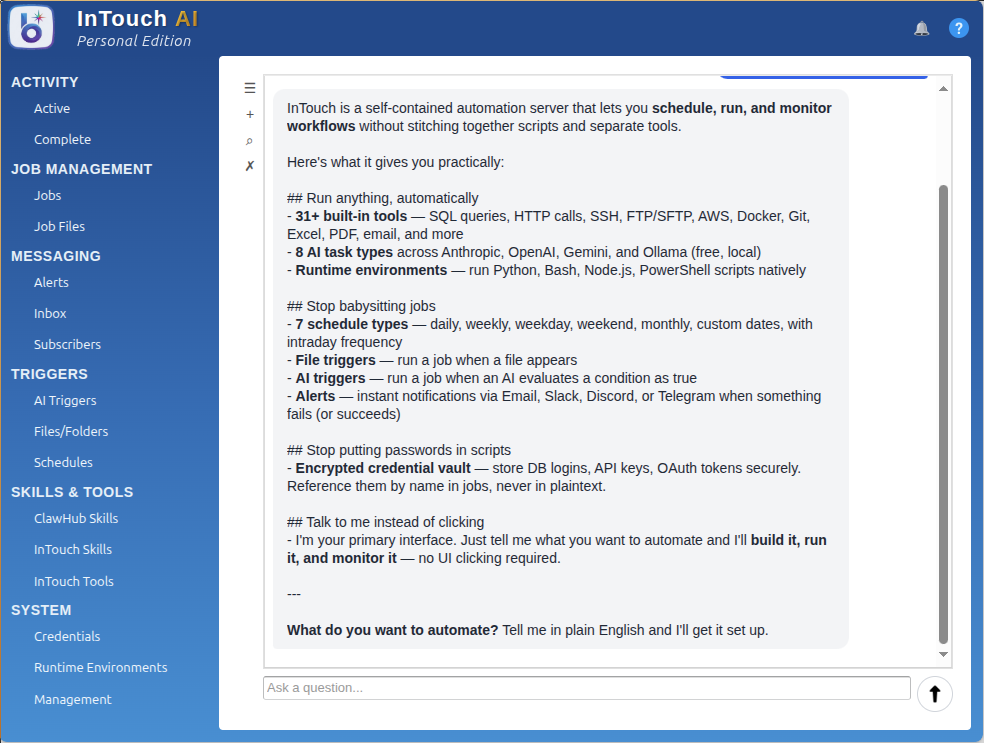
"What Can You Do?"

The assistant tells you, in your context, what it can build for you — not a list of features, an answer.

InTouch AI assistant answering what it can do

One Assistant. Every Job Function.

Same engine, same tools, same audit trail — tailored to the person asking. Nineteen real conversations, one product.

Click any thumbnail to enlarge.

From AI That Answers to AI That Acts

An LLM in a chat window can summarize a doc and draft a paragraph. That's where most "AI" stops. Here's what changes when the AI can actually do the work — with the governance enterprise teams require.

From Q&A to Action

Before: "Hey ChatGPT, what jobs failed last night?" answered with a polite reminder that it doesn't have access to your data.

After: an agent with 76 tool_use functions calls get_all_work_history, then get_active_job_log for the failures, then drafts a status summary — all in one turn, all on your server, all in the audit log.

From Open Permissions to Bound by RBAC

Before: a "do-anything" agent that authenticates as a service account with broad credentials, opaque to your audit trail.

After: the assistant operates as the calling user. RBAC enforced per-action. Credential vault never exposed. Every tool call logged with the user identity, inputs, and result. Compliance and security stop saying no.

From Code-Only to Every Surface

Before: the AI agent lives behind a developer-only API. Business teams open tickets and wait for engineering to translate.

After: the same agent works from the web UI, the InTouch PWA, the InTouch Android app, and the REST API — carrying the same multi-turn conversation across surfaces, available to everyone with a publisher login.

What the Assistant Actually Does

A

Agentic, not Conversational

Tool-use is the first-class interaction pattern. The assistant sees a roster of platform tools (create_job, run_task, list_credentials, install_skill, configure_schedule, and more) and invokes them to carry out what you asked for. The answer you get back is the result of real work.

M

Multi-Turn Memory

Chat history persists across sessions. The assistant auto-titles conversations, so "the one where we fixed the payroll export" is actually findable. Context carries forward, so follow-ups don't start from zero.

C

Surface Passthrough

Start a conversation in the web UI, continue from the InTouch PWA on your phone, finish from the Android app — same chat history, same context. Every surface authenticates with your InTouch login.

R

RAG-Grounded Answers

Documents chunked and embedded into any of the 7 supported vector stores. Retrieval-augmented responses cite your documents — the assistant answers from your data, not from training-set hallucinations.

S

Streaming SSE

Server-Sent Events stream the assistant's response as it's generated. Time-to-first-byte is a solved problem — no 15-second wait for the spinner to disappear. Vaadin Push carries it into the browser.

K

Skill Invocation

Type @ followed by a skill name in the assistant chat to run a skill directly, bypassing the agent loop entirely. Deterministic, fast, audit-logged. Great for "just run the weekly thing" shortcuts.

The Provider Is a Config Setting, Not a Vendor Lock-In

InTouch speaks to eight AI providers natively in every edition: Anthropic Claude, OpenAI, Mistral, Groq, DeepSeek, xAI Grok, Google Gemini, and Ollama (for local models). Hugging Face rounds out the set as a 9th, job-only provider. Each is a first-class tool. The assistant itself and every individual AI tool can target a different provider, swappable per tool by changing the tool name and credential reference.

If Anthropic refuses your domain — and it sometimes does: financial advice, legal synthesis, medical analysis — swap to Ollama with a local model. Zero restrictions, zero API cost, no data leaving the network. Works air-gapped. The job definition doesn't change; only the tool name and credential do.

This isn't an abstraction layer that papers over provider differences. Each provider's distinctive features (Claude's extended thinking, OpenAI's function calling variants, Gemini's multi-modal, Ollama's local model roster) is exposed directly. Swap when the use case changes. Don't accept a lowest-common-denominator wrapper.

# Restricted domain? Local model. - name: classify-complaint tool: ollama credential: ollama-internal model: llama3.2 prompt: "${input}" # Deep reasoning? Claude Opus. - name: summarize-contract tool: anthropic credential: anthropic-prod model: claude-opus-4-6 # Volume pricing? GPT-4o-mini. - name: enrich-row tool: openai credential: openai-prod model: gpt-4o-mini

Conversation Is the Primary UI

You describe what you need — the assistant builds it. Jobs, schedules, credentials, triggers, alerts, skills. The web UI forms are for verification and fine-tuning; the assistant is for creation.

Example: "Build me a sales export"

"Every weekday at 6am, export the sales table from the prod MySQL, transform to add YoY deltas, and email the CSV to [email protected] with a one-line summary."

The assistant creates the credential references, the job with four tools (SQL → DataFrame → Anthropic summarize → Email), a weekday schedule at 06:00, and attaches an alert. Walks you through each step for confirmation. End state: a working pipeline and a test run.

Example: "Who's got access to prod-mysql?"

"List all publishers and groups with read or update rights on the prod-mysql credential."

The assistant queries the RBAC tables, filters to that credential's rights matrix, renders a table in chat. You didn't need to remember which endpoint or which filter. You asked the question.

Things That Made the Product Better the Boring Way

System-Prompt Discipline

The assistant's system prompt is tight — tools are described in structured JSON schema, not prose; the reference knowledge base loads via keyword-retrieval RAG, not a full-document dump. That kept the context window honest and the response times sub-second.

429 Retry with Backoff

Rate-limit responses from any provider are retried with exponential backoff and jitter. The assistant doesn't give up on the first 429; it surfaces the issue only when retries are exhausted. Invisible robustness, which is the good kind.

Tool Classification + Caching

Not every message needs the full agent loop. A classifier routes trivial questions to cached responses; heavy orchestration messages go through the full tool-use pipeline. Cost goes down, TTFB goes down, nothing else changes.

The Conversation Stays on Your Server

No Third-Party Middleman

The assistant runs in your InTouch server. Messages from Slack go from Slack straight to your server, not to a SaaS relay in between. The data path is one hop shorter than every "AI chatbot" product built on top of OpenAI.

Auditable Reasoning

Every tool call the assistant makes is logged with the arguments it chose. Reviewing "why did it do that?" is a log query. Contrast with closed assistants where the reasoning chain is a black box even to the vendor.

Air-Gapped Option

Run everything on Ollama. No upstream network calls. Great for defense, medical, legal, and financial deployments with strict egress controls.

Talk to Your Automation Platform

Describe what you need. Get a working pipeline. Try it free with the Personal edition.

Get Personal Edition Talk to Sales